Showing posts with label Management Packs. Show all posts

Monday, October 29, 2018

SCOM 1807 Universal Linux Monitoring

Recently discovered that some of the CentOS boxes that I've pushed the agent into came up as “Version Unknown” at the UNIX/Linux Computers within the Administration space in the SCOM console.

Checking further, there’s no monitoring data for the usual CPU / Memory / Logical Disk and Network from the servers.

Did a bit of troubleshooting and realized that from the “Microsoft System Center 1807 MP for UNIX and Linux” downloaded here, it seems to be missing the “Microsoft.Linux.Universal.Monitoring.mp”

image

Once imported the relevant mp from the SCOM 1801 media (notice the version difference), all started to work again Smile

Tuesday, October 9, 2018

Monitoring SNMP v1 Trap

Creating a post on some work I'd done couple of year ago so that it won’t be forgotten.

I know SNMPv1 is definitely obsolete by now but what if there are still some requirements to monitor SNMPv1 traps with SCOM ?

One of the way is to

  1. Create a custom MP on the trap you are going monitor with SCOM
  2. Export that custom MP as an XML
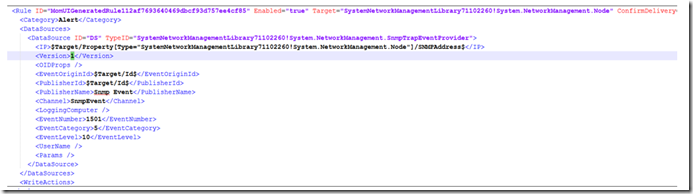
  3. Within the XML file, locate the version tag (<version>…</version>)
  4. Replace the string within the tag to 1, refer samples below


Before

image


After

image


and that should do the trick Smile

Thursday, January 18, 2018

SCOM PowerShell Script Monitors

I was recently asked if there’s a way to raise a SCOM alert when a scheduled task is not in “Running” state. From the community MPs, I reckoned it is only giving an alert when the tasks return a “Failed” state. I might be wrong, but if there’s one out there, appreciate if someone can enlighten me on this.

Have tried using vbscript via WMI calls but it worth taking note that, while it makes a query from “Win32_ScheduledJob” class, tasks created in the Windows Task Scheduler will not be listed.

We ended up exploring PowerShell and managed to write a simple script for this, but setting up the monitor was not as straight forward as it seemed.

Out of the box, SCOM provides the functionality to create VBScript based monitors, but if you are to create a similar monitor with PowerShell, first impression is that the monitor seemed working as expected (giving you a green tick), but as you test further, you will notice that the health state does not get updated, even when it qualifies for an unhealthy condition.

Looking at the OperationsManager event logs, you should see event 21405, saying the process failed to create System.PropertyBagData…, and interestingly, SCOM was trying to execute your PowerShell script using cscript.exe

Command executed:    "C:\Windows\system32\cscript.exe" /nologo "<your ps script>.ps1", as you can see below


To fix this, you either create a new custom MP to include the PowerShell script monitor (either Silect , VSAE) OR import a PowerShell script community based MP. I chose the latter since it is only a simple monitor and didn’t want to spend more time into it.

Once imported, you should be able to create a script based monitor, only this time, instead of VBScript, it will be in PowerShell.

Hope this helps :)

Wednesday, October 8, 2014

SCOM SharePoint 2010 MP troubleshooting

Encountered the following error message in SCOM event viewer for one of the SharePoint 2010 servers. Searching around the net, found 2 links with valuable information on resolving it.

http://www.scom2k7.com/advanced-troubleshooting-of-the-sharepoint-2010-mp/

http://thoughtsonopsmgr.blogspot.com.au/2013/04/troubleshooting-sharepoint-server-2013.html

Basically it seemed might have to do with PowerShell 3.0 (for Sharepoint 2010), and one of the solution was to uninstall the PowerShell 3.0, but before doing so, you might want to verify it further by granting the SCOM SharePoint MP account to have SP farm admin rights, to see if it is able to launch the SP cmdlets.

Hope this helps :)